![How to Fix YouTube There Was A Problem In The Server [400] Error?](https://www.hatauzmani.com/uploads/images/202403/image_380x226_65f1745c66570.jpg)












Fix: Dota 2 File Verification Failure Error
In this article, we will try to resolve the "File Verification Failure. Relaunch With -insecure" error that Dota 2 players encounter after running the game.
Dota 2 players are restricted from accessing the game by encountering the error "File Verification Failure. Relaunch With -insecure" after running the game. If you are facing suchaproblem, you can findasolution by following the suggestions below.
What is Dota 2 File Verification Failure Error?
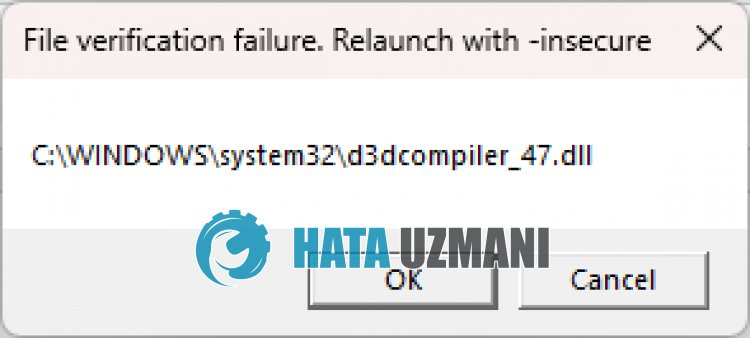
This error is usually caused by damaged or unreadable Windows files. Of course, we may encounter such an error not only because of this problem, but also because of many other problems. For this, you can reach the solution of the problem by telling youafew suggestions.
How To Fix Dota 2 File Verification Failure Error
To fix this error, you can find the solution to the problem by following the suggestions below.
1-) Reload Windows Library
Damage or inability to read some Windowslibraries such as
DirectX, VC Runtime can cause us to encounter various errorslike this. For this, click on thelinks below to perform the download process. Then restart your computer by performing the installation process again and check if the problem persists. If thelibrary is already installed, you can repair it.
- Click to Download Current .NET Framework.
- Click to Download Current VCRedist. (x64)
- Click to Download Updated VCRedist. (x86)
- Click to Download Current DirectX.
In order to load the DirectXlibrary, first, let's check which file we got an error in. The error shown in the picture is the file "d3dcompiler_47.dll". We may encounter various errorslike this if this file is not installed or cannot be read. For this, let's delete the "d3dcompiler_47.dll" file by following the file path and run the downloaded "DXSetup.exe" file and perform the installation process. After this process, let's restart the computer and check if the problem persists.
2-) Verify File Integrity
We will verify the game file integrity and scan and download any missing or incorrect files. For this;
- Open the Steam program.
- Open thelibrary menu.
- Right click on the "Dota 2" game on the left and open the "Properties" tab.
- Open the "Local Files" menu on the left side of the screen that opens.
- Click on the "Verify integrity of game files" button in the Local Files menu we encountered.
After this process, the download will be performed by scanning the damaged game files. After the process is finished, try to open the game again.
3-) Fix Windows Errors
The files in Windows are damaged or corrupted, which can lead to various errors. For this, we will share two code blocks with you and try to scan and repair damaged or corrupted files.
Do an SFC Scan
Damaged or corrupted files that occur in Windows files can cause many error codes. For this, we will tell youafew ways to solve the problem.
- Type "cmd" in the start search screen and run as administrator.
- Type "sfc /scannow" into the command prompt that opens and press enter.
After this process, corrupted or damaged files will be scanned and corrections will be made. Do not shut down or restart your computer until the process is complete. After this process, let's perform another suggestion.
DoaDISM Scan
- Type "cmd" in the start search screen and run as administrator.
- Type the following commands in the command prompt screen that opens and press enter.
- Dism /Online /Cleanup-Image /CheckHealth
- Dism /Online /Cleanup-Image /ScanHealth
- Dism /Online /Cleanup-Image /RestoreHealth
After the process is completed successfully, you can restart your computer and check if the problem persists.
4-) Update Operating System
The fact that the Windows operating system is not up-to-date can cause us to encounter various errorslike this. For this, we need to check whether the Windows operating system is requesting an update. Ifanew update is available, you can check whether the problem persists by performing the update process.
Yes, friends, we have solved our problem under this title. If your problem persists, you can ask about the errors you encounter by entering our FORUM platform.